
Concepts
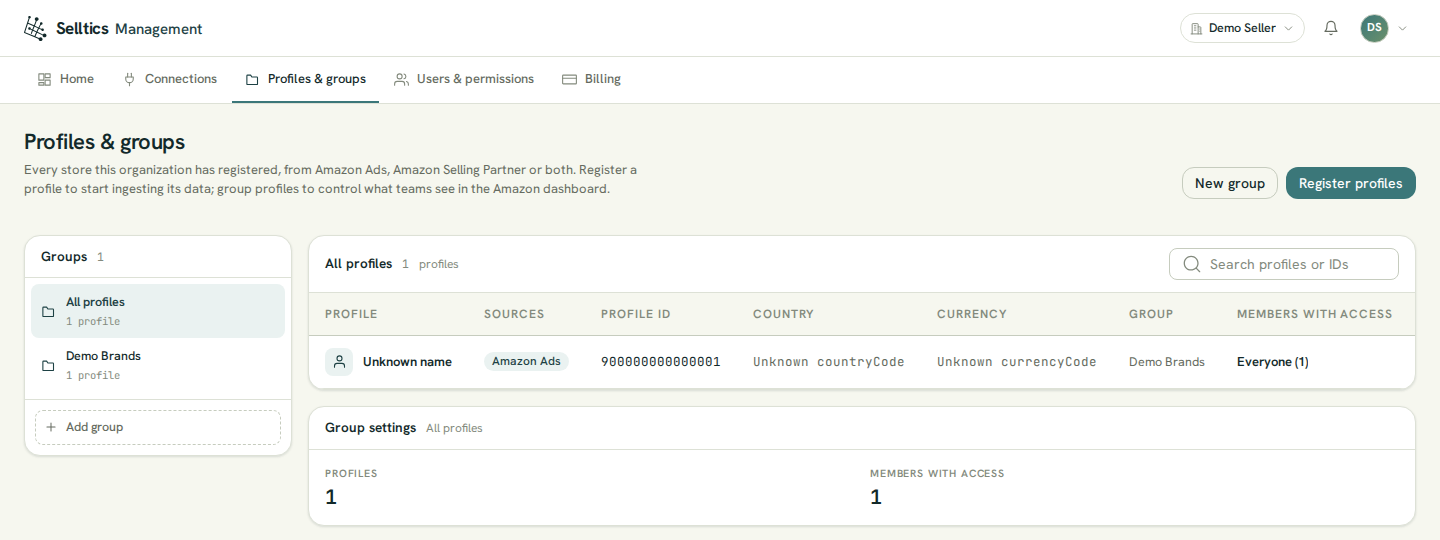
The vocabulary the rest of this guide relies on, and how the objects relate. Most of them are managed on the Profiles & groups screen of the management dashboard:
Demo data
The demo profile's name, country and currency read "Unknown …" because the demo data on this screenshot cannot be looked up at Amazon; a real profile shows the values Amazon reports.
How the objects relate
Each object is described in its own section below.
Organization
Your company's account in Selltics. The connections, profiles, groups, members, roles, the plan and the dollar balance all belong to one organization, and a person may belong to several.
Every screen acts in the organization chosen in the switcher at the top right. How organizations, members and roles work is on Organization.
Connection
An authorisation you gave Selltics at Amazon. There are two kinds:
- an Amazon Ads connection — one Login with Amazon consent in one Amazon region, which can reach the advertising profiles of that login;
- an Amazon Selling Partner connection — one seller account in one region, which can read the orders of the marketplaces the seller participates in.
A connection on its own reads nothing: data flows only for the profiles you register from it. See Connections.
Profile
A profile is one store — and one unit of the profile quota you are billed for. It reads from an Amazon Ads source, an Amazon Selling Partner source, or both, never two of the same kind. The Sources column shows which.
Its sources
- An Amazon Ads source is one advertising profile: one advertiser in one marketplace (see Profiles and accounts). Profile ID is Amazon's advertising profile id; it is a dash on a Selling Partner-only profile, which has none.
- A Selling Partner source is one marketplace of one seller account (see Selling partner).
- Country and currency come from the Amazon Ads source, else from the Selling Partner data.
- A Selling Partner-only profile is named after its store, else its marketplace.
How the two sources combine
- A Selling Partner marketplace joins an existing Amazon Ads profile only when both belong to the same seller account in the same marketplace. Anything else becomes a separate profile, which is billed like any other.
- Removing the Selling Partner source from a profile that also has Amazon Ads keeps the profile and its quota place. A Selling Partner-only profile can only be removed whole.
Second profile
Amazon Ads cannot yet be added to an existing Selling Partner-only profile. Registering that Amazon Ads profile creates a second profile; the picker warns about it.
Removing a profile
Removing a profile stops billing for it and stops its data. An Amazon Ads account that was registered stays bound to your organization even after the removal, so another organization cannot register it; support can move it.
Profile group
A named set of profiles.
- Every profile is filed in a group when it is registered; nothing creates a group for you, so a new organization creates its first one while registering profiles.
- Groups filter the profile table.
- When you grant a member access "by group", Selltics copies the profiles the group holds at that moment — later changes to the group do not reach the grant.
- Deleting a group keeps its profiles; they are listed as Ungrouped.
Members with access
The last column counts who can see each profile:
- Everyone (N) when every member can;
- N members when some can;
- Nobody when none can;
- N invited under it for pending invitations that would grant it.
The owner always sees every profile. Which members exactly is answered on the Users screen, filtered by profile — see Organization.
Portfolio action
A scheduled change of an Amazon Ads portfolio budget: every day, or every given weekday, at a given hour (UTC), Selltics sets the portfolio's budget on Amazon to the amount you chose.
The one write
It is the one thing Selltics changes in your Amazon account. Portfolio actions live in the Amazon dashboard and are billed as managed portfolios.