
AI analyst
The AI analyst is a Telegram bot. You link a Telegram chat to your organization, then ask about your advertising in plain language; it reads your data, can draw charts, and answers in the chat. The same chat can also receive Selltics notifications.
Linking a chat
Chats are managed in Connections → Integrations:
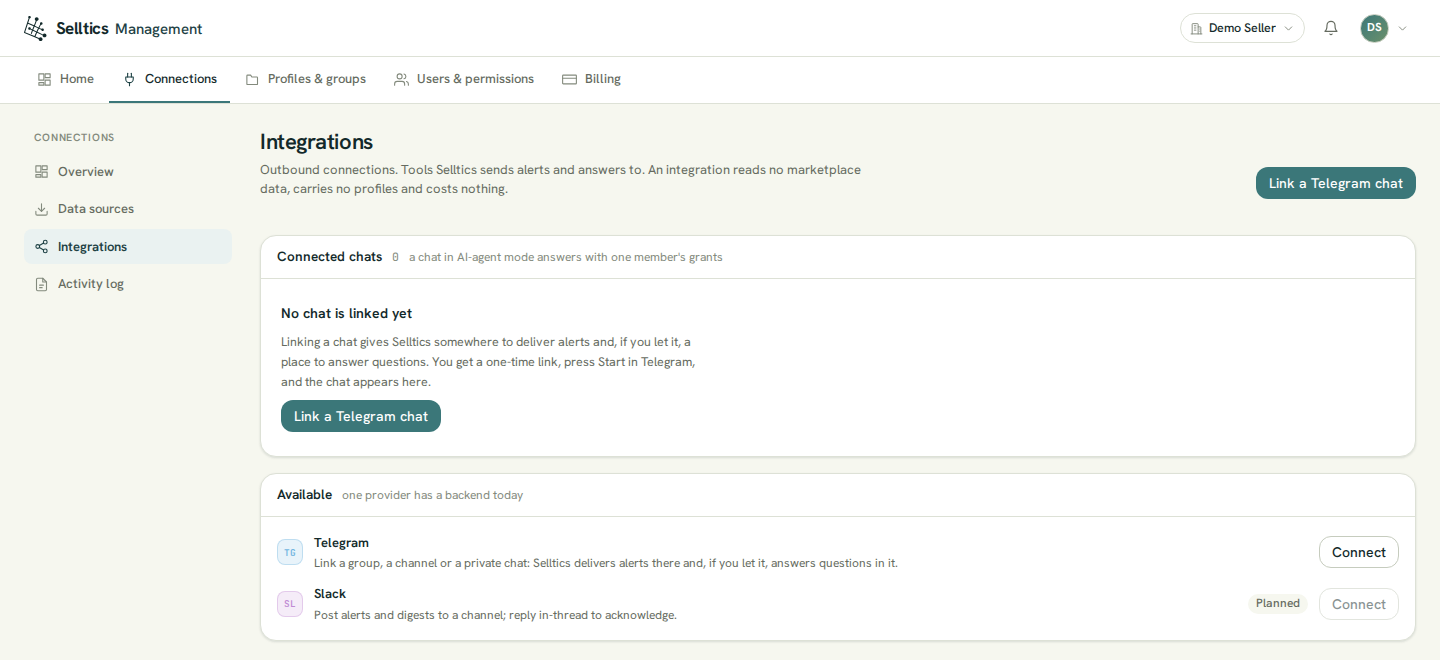
- Press Link a Telegram chat. The dialog shows a one-time link and the code inside it.
- Open the link in Telegram and press Start — in a private chat with the bot, or in a group the bot was added to.
- The dialog notices within a few seconds and confirms the link.
One-time link
The link is valid for 15 minutes and is shown only in this dialog — after a reload the chat row shows its deadline and offers a new code, and a new code replaces the old one.
- A chat belongs to one organization. A chat already linked elsewhere is refused until it is unlinked there.
- An expired or used link is refused with a request to generate a new one.
- Unlinking removes the chat from the list; the same chat can be linked again later.
Who the chat acts as
- A linked chat answers with the profile access of the member who created the link, for everyone in that chat.
- A member restricted to some profiles creates a chat that sees only those; in a group, every participant sees what that member sees.
- The role permission Use AI chatbot is not checked in Telegram.
- Linking and managing chats needs Link chats & manage integrations.
Chat modes
Each chat has a mode, set in its settings:
- AI agent (the default) — the bot answers questions and sends nothing unprompted;
- Notifications — Selltics delivers the chosen events and answers nothing; a question gets one line saying so;
- Both — answers and notifications.
Five notification events are listed:
- Sync failure — a data source stopped ingesting and has to be reauthorised — is the only one sent today;
- the other four (budget alert, quota threshold, automation run, weekly digest) are shown disabled.
Switching back
The event choice is kept while the chat is in AI agent mode, so switching back restores it.
How a question runs
The bot takes a question from the chat, reads the metrics Selltics collects and live Amazon data, answers in the chat and charges the tokens to the balance. The sections below give each step.
Asking
- In a private chat, just write. In a group, mention the bot by its @username or reply to one of its messages; other messages are ignored.
- One question at a time per chat: while an answer is being prepared, another message or button is refused with a note to wait.
- The bot first posts "Working on it…", shows which data it is reading while it works, then replaces that message with the answer. An answer may end with suggested follow-up questions as buttons.
- When a question is missing something essential — the period, the profile, the product — the bot asks back with a short form instead of guessing.
What it can read
- Performance metrics of Amazon Ads, per profile, campaign or other dimension, by hour, day, week or in total — from the data Selltics collects (see Connections); the terms are explained in the Metrics glossary;
- budget usage and the history of campaigns — state, budget and bidding over time;
- the current campaigns, ad groups, targets, ads, portfolios and product details, read live from Amazon at the moment you ask;
- your profiles, with their sources, marketplaces and currencies;
- Selling Partner orders of the marketplaces added as profiles:
- the last 7 days unless you ask otherwise;
- up to 31 days and up to 200 orders per question;
- across at most 20 Selling Partner profiles at a time;
- public holidays and retail events of a marketplace's country;
- and it can turn numbers into a chart image.
Sandbox orders
While Selltics' Selling Partner application is in Amazon's sandbox, these are Amazon's fixed test orders, and the bot says so.
It reads only the profiles the chat may see, and nothing of another organization. It does not change anything in your Amazon account.
What it costs
- Each answer is charged after it is given, from the LLM tokens it used: $0.75 per 1,000 credits, where 1 credit is 1,000 tokens.
- A question that reads a lot of data uses more tokens.
- The charge is taken from the organization's dollar balance.
- Every answer ends with a small line showing how long it took and how many credits it used.
Zero balance
While the balance is zero or below, the bot refuses new questions. See Billing.